
SASSA Status Check – SRD R370 Payment Dates (2026)
Published: Updated: · 6 min read · Last verified against the official SASSA SRD portal: May 2026 Written by: Themba Matlou
The SASSA SRD R370 grant is a monthly social relief payment issued by the South African Social Security Agency (SASSA) to unemployed citizens and residents who have no income or financial support. To receive your payment, your application status must be approved for each month individually - approval in one month does not guarantee approval in the next.
Beneficiaries can check their SASSA SRD status online using their South African ID number and registered phone number. Your status will reflect as Approved, Pending, or Declined based on SASSA's monthly means test and eligibility verification against government databases including SARS, UIF, and NSFAS.
Your privacy is protected. We do not collect, store, or process your ID number or phone number. Clicking the button below opens the official SRD SASSA status portal directly - we simply guide you here.
Use this official SASSA portal to check your SRD application status and payment date.
Check Your SRD Status on Official WebsiteYou will need two things to check your SASSA SRD status:
- Your valid 13-digit South African ID number
- Your 10-digit mobile number registered with SASSA
Both must match exactly what is on your SASSA application. Using a different number will return no result, not because something is wrong, but because SASSA links your entire application to that specific number.
Got your application result? Below table describes where to go next:
| Your Status | What It Means | Next Step |
|---|---|---|
| Pending | Verification still in progress | What Pending means and what to do → |
| Approved | You qualify for this month | No payment date yet? Read this → |
| Declined | Not approved — reason shown | Find your decline reason and what to do → |
SASSA Payment Dates for June 2026
| Month | Older Persons Grant | Disability Grant | Child Support Grant | SRD R370 Grant |
|---|---|---|---|---|
| June 2026 |
Need to check your payment method release timelines ?. Jump to: Payment Release TimeFrame for Specific Banks
Having trouble or still stuck? Contact SASSA directly on their toll-free number: 0800 60 10 11 (Monday to Friday, 08:00–16:00) or visit the official SASSA portal at sassa.gov.za
Official SASSA Payment Dates – May 2026
SASSA SRD R370 payment dates for May 2026 have been officially confirmed. SASSA will process SRD R370 payments from Saturday, 23 May 2026. Since SASSA does not process payments on weekends, most approved beneficiaries will receive their funds between Monday, 25 May and Friday, 29 May 2026.
| Payday | Day | Collection Time |
|---|---|---|
| Monday | to | |
| Tuesday | to | |
| Wednesday | to | |
| Thursday | to | |
| Friday | to |
Note: To view your exact payment date, you must check your SASSA SRD status online. Click on button given below:
Official SRD Payment Dates – April 2026
- 23–24 April 2026: First SRD payment batch processed
- 29–30 April 2026: Second SRD payment batch processed
| Payday | Day | Collection Time |
|---|---|---|
| Thursday | to | |
| Friday | to | |
| Wednesday | to | |
| Thursday | to |
March 2026 SRD Payment Schedule
| Payday | Day | Collection Time |
|---|---|---|
| Monday | to | |
| Tuesday | to | |
| Wednesday | to | |
| Thursday | to | |
| Friday | to |
SASSA publishes SRD R370 payment windows for each month. These are official payment processing dates, not individual paydays. Beneficiaries receive payments in batches, and each person is assigned a unique SRD payment date after approval and verification.
Payment date tables for upcoming months are added here as SASSA confirms them. Previous months are removed once payments have been processed.
Approved but no payment date showing yet? If it is before the 20th of the month, your date has likely not been assigned yet. If it is after the 20th and there is still no date, there may be a specific blocker on your application. Find out why and what to do
When does SASSA release SRD payments?
SASSA processes and releases SRD payments in batches during the last week of each month. The tables below show the payment release windows for 2026, these are the days SASSA releases payments, not your guaranteed individual date. Your specific date will appear on your status once approved.
Expected Timeline to Receive Payment via Different Banks
| Payment Method | When You Can Receive Your Money |
|---|---|
| Timeline for Bank Accounts | Typically 2 to 3 business days after the Pay Date. Your bank needs this time to process and clear the deposit. |
| Timeline for Cash Send Payments | Often on the SAME DAY as the Allowance Date or the very next business day. You'll get an SMS with a reference number to collect. |
| SASSA Black Card Timeline | Usually on the fund release date itself. You can swipe or withdraw at an ATM once the payment reflects. |
Looking for payment dates for other SASSA grants? Old Age Pension, Disability Grant, and Child Support Grant payments follow a fixed monthly schedule. View the full SASSA 2026 2027 Payment Dates schedule
SRD Status Check - FlowChart
See what happens from the moment you check your SRD grant status to the final outcome
SRD Appeal Status Check
If you have already submitted an appeal for a declined month, check your appeal outcome below. This is a separate check from your monthly grant status above.
Your privacy is protected. We do not collect, store, or process your ID number or phone number. The button above opens the official SASSA Appeals Portal directly.
You will need your 13-digit South African ID number and the mobile number linked to your SRD application to receive your OTP and access your appeal result.
How to change your SRD phone number →No longer have access to that number?You cannot access the appeals portal until you update it first.What your appeal result means:
| Appeal Result | What It Means | Next Step |
|---|---|---|
| Appeal Pending | Your appeal is still being reviewed by ITSAA | Check back in a few days, reviews take 60 to 90 days |
| Appeal Approved | ITSAA approved your appeal | SASSA will back-pay that month, check your grant status for payment date |
| Appeal Declined | ITSAA upheld the original decline | The decision is final for that month, See appeal status FAQs below |
ITSAA, the Independent Tribunal for Social Assistance Appeals, reviews all SRD appeals independently from SASSA.

Not yet appealed and want to? The appeal process is separate from this status check. Read our step-by-step SRD appeal guide → before submitting, there is a 90-day deadline from the date of decline.
Appeal Status FAQs
Can I appeal again if my appeal was declined?
No. Once ITSAA declines an appeal for a specific month, that decision is final for that month within the SASSA system. You cannot submit a second appeal for the same month.
Does a declined appeal affect my next month's SRD application?
No. Each month is assessed independently. A declined appeal for one month has no effect on your eligibility or result in any future month.
Can I take the matter further if my appeal is declined?
Yes, but it is outside the SASSA system entirely. If you believe ITSAA made a procedural error or acted unfairly, your remaining option is a judicial review through the courts. This is a formal legal process and requires the assistance of a qualified attorney or legal aid. You can contact the Legal Aid South Africa helpline on 0800 110 110 for free legal advice if you cannot afford a private attorney.
eKYC Identity Verification Status Check
From September 2025, SASSA requires all SRD applicants to complete biometric identity verification (eKYC) before any payment can be released. If you have submitted your verification or been asked to complete it, check your eKYC status below.
🔒 Your privacy is protected. The button above opens the official SASSA portal directly — we do not collect your images or store any of your information.
The official SASSA portal offers three eKYC checks. Use the one that matches your situation:
| Check | when to Use |
|---|---|
| eKYC Status Check | You have already submitted your facial verification and want to see if it has been confirmed |
| Do Reverification | Your first eKYC attempt was unsuccessful or rejected and you need to redo it |
| Do eKYC — Referred Status | Your application was flagged as Referred and you need to complete biometric verification to clear it |
What your eKYC status means:
- Verification Pending: Your facial scan has been submitted and is being matched against Department of Home Affairs records. This takes between 48 hours and 21 working days. No action needed, check back after a few days.
- Verified: Your identity has been confirmed. If your grant status is still Pending or showing no payment date, allow a short time for the system to update across all checks.
- Failed / Not Verified: Your biometric scan could not be matched. You need to redo the verification. Use the Do Reverification option on the portal. Ensure you are in good lighting and using a clear, recent facial scan. A Smart ID card gives a better match result than the old green ID book.
- Not Yet Completed: You have not submitted your eKYC at all. Until this is done your status will remain Pending and no payment can be processed. Complete it immediately.
SRD eKYC Status Check FAQs
My grant status is Approved but eKYC still shows Pending — will I still be paid?
Payment will not be released until eKYC clears. An Approved grant status and a confirmed eKYC are both required before a payment date is assigned. Allow up to 21 working days after submission for verification to complete.
My eKYC failed — does that mean my application is declined?
No. A failed eKYC is not a decline. It means the biometric match was unsuccessful and you need to redo the verification using the Do Reverification option. Once it clears, your application continues normally.
What is the Referred status and why does it need a separate eKYC check?
Referred means SASSA's system flagged your application for a manual identity review, usually due to a potential fraud or mismatch signal. The standard eKYC process is not sufficient to clear a Referred status. You must use the dedicated Do eKYC — Referred Status option, or visit your nearest SASSA office in person with your ID document.
Other Methods to Check Your SRD Status
The official SASSA SRD portal is the most reliable method and shows your full month-by-month history. If you cannot access it, use any of the alternatives below.
Method 1 — Official SASSA SRD Portal (Recommended)
The primary and most detailed method. Shows your full status history across all months, your payment date if approved, and your decline reason if applicable.
- Go to srd.sassa.gov.za/sc19/status ↗
- Enter your 13-digit South African ID number
- Enter the mobile number you used when you applied
- Click Submit, your SRD status for each month will be displayed
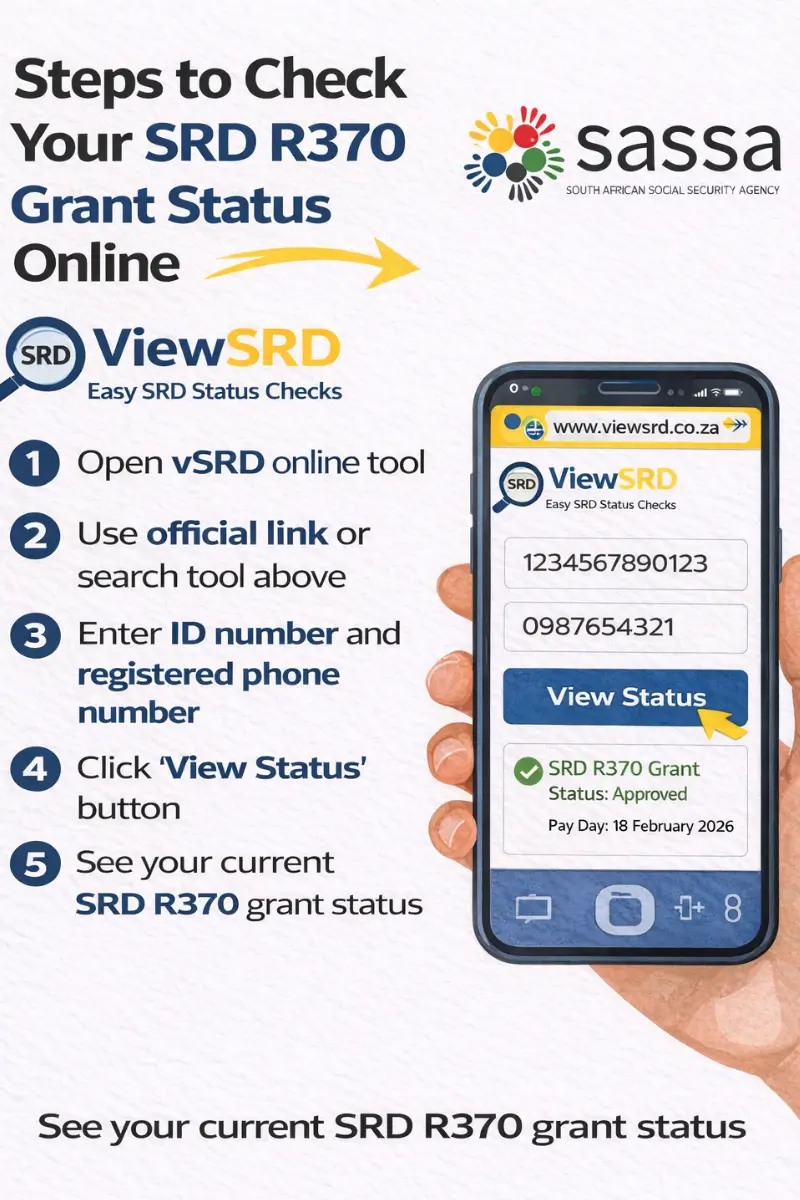
Method 2 — ViewSRD Tool (This Site)
Use the tool at the top of this page. It opens the official SASSA portal directly in a secure window, no data is collected on our end. Your full month history is visible, not just the current month.
Bookmark vsrd.co.za directly. Avoid searching for sassa status checks on social media and browsers, fake links are widespread.
Method 3 — WhatsApp
A convenient option for a quick status result without needing a browser.
- Save 082 046 8553 in your contacts as "SASSA Official"
- Open WhatsApp and send the word "Status" to start the chat
- The SASSA chatbot will ask for your ID and registered phone number
- Your current status will be returned in the chat
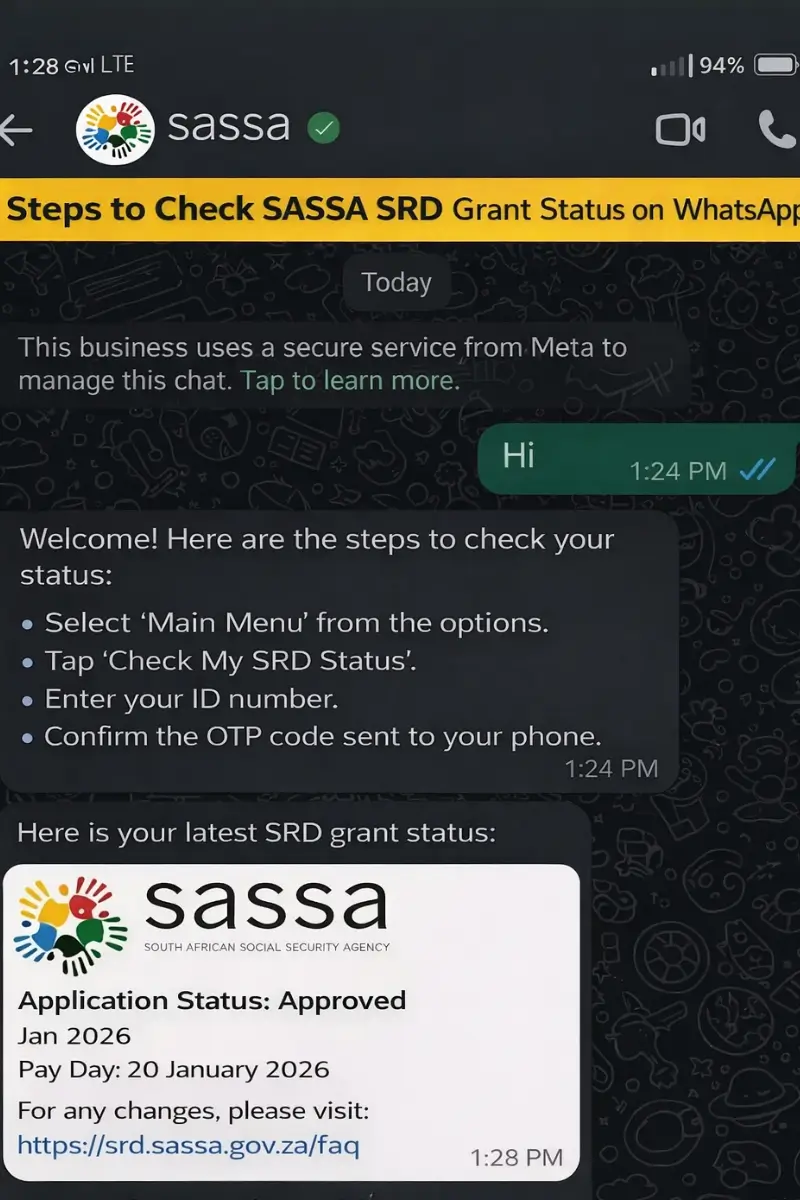
Available 24/7. Only use this number (082 046 8553) do not use any other WhatsApp number claiming to be SASSA
Method 4 — USSD Code (No Internet Required)
Works on any South African cell phone without data or a smartphone.
- Dial *134*7737# from your registered SIM card
- Select the SRD status option from the menu
- Enter your ID number when prompted
- Your status will display on screen
Standard network rates may apply. If the session times out, try again or use the portal.
Method 5 — SMS
A basic option if you have no internet or WhatsApp access.
- Open SMS on your phone
- Type: STATUS followed by your 13-digit ID number (e.g. STATUS 1234567890123)
- Send to 32555 from the mobile number registered on your SASSA application
- You will receive a reply with your current status
Method 6 — Moya App (Data-Free)
The Moya App is a legitimate South African app that allows you to access the SASSA SRD status portal without using any mobile data.
- Download the Moya App from the Google Play Store or Apple App Store
- Open the app and navigate to the SASSA SRD section
- Enter your ID number and registered phone number
- Your status will be displayed at no data cost
This is not an official SASSA app — it is a data-free browser. SASSA has not launched an official dedicated app. Only use apps you have confirmed from verified sources.
Method 7 — SASSA Call Centre
Call 0800 60 10 11 (toll-free, Monday to Friday 08:00–16:00) and follow the voice prompts for SRD status. Have your ID number and registered phone number ready. Useful if all digital methods are unavailable or if you need to speak to an agent about a specific issue.
Method 8 — Visit a SASSA Office
If you are unable to resolve your status online or by phone, visit your nearest SASSA office in person. Bring your South African ID document and the mobile number linked to your application. Staff can check your profile and advise on next steps
Find your nearest office: Here ↗
SRD Status FAQ’s
What do I need to check my SRD status?
Your 13-digit South African ID number and the 10-digit mobile number you used when you applied. Both must match your SASSA application exactly. Using a different number will return no result.
How often does SRD status update?
SASSA processes applications in monthly batches, results do not update in real time. Check every few days rather than multiple times a day. If your status has not changed after two weeks, there may be a specific reason holding your result.
Why is my status different for different months?
The SRD grant is assessed month by month, each month is a separate verification. Being approved in one month does not carry over to the next. Always check the specific month shown next to your result on the portal.
My details are correct but no status is showing — why?
The most common cause is a phone number mismatch. Your entire SASSA profile is linked to the number you registered with. If you have changed your number since applying, you need to update it on the SRD portal before your status will display.
How much is the SRD grant in 2026 and is it ending?
The grant remains at R370 per month. The SRD grant has been allocated an additional R36.4 billion to extend payments until 31 March 2027 at the current R370 per month. No increase was announced in the 25 February 2026 Budget Speech. Any social media post claiming the grant is ending or increasing to R400, R700, or any other amount is false.
When will I receive my payment after being approved?
SRD payments are released in the last week of the month. Your exact payment date is assigned individually and will appear on your status once processed, there is no single fixed date for all applicants.
SRD R370 — Complete Resource Hub
Everything an SRD applicant may need in one place. Select what applies to your situation.
How to Apply? First time applying or need to reapply for the current periodHow to Appeal Appealing a declined month, what to include, and deadlines.Identity VerificationComplete or redo your eKYC biometric verification.Change Phone NumberUpdate the mobile number linked to your SRD application.Change Banking DetailsUpdate your payment method or bank account.SASSA Payment DatesSASSA social grant payment schedule for 2026–2027.Latest SASSA NewsRecent SRD updates, policy changes, and announcements.Protect Yourself — SRD Scams to Watch Out For
SASSA has issued official fraud alerts warning SRD applicants about scams specifically targeting grant beneficiaries. Fraudsters know when payments are due and when applicants are anxious about a pending or declined status and they use that vulnerability deliberately.
SASSA will never:
| SASSA Never Ask For |
|---|
| Send you a WhatsApp message asking for your OTP, ID number, or banking details |
| Ask you to pay any fee to approve, speed up, or fix your application |
| Ask for your bank PIN, password, or card number under any circumstances |
| Contact you via personal social media accounts or unofficial WhatsApp groups |
Common scams to recognise:
Fake "SASSA agents" on WhatsApp Scammers pose as SASSA officials offering to fix a pending or declined status for a fee or in exchange for your OTP. No individual can manually change your SASSA status, anyone claiming otherwise is a scammer.
Phishing websites designed to look almost identical to the official SASSA portal. Always confirm the address starts with srd.sassa.gov.za before entering any personal details. If the URL looks slightly different, even by one character, close it immediately.
False grant increase announcements Fake social media posts claiming the SRD grant has increased to R400, R700, or higher. No increase is official unless announced directly by the Department of Social Development on sassa.gov.za.
Fake SASSA apps There is no official SASSA SRD app. Any app on the Play Store or App Store claiming to check or manage your SRD grant is unofficial. Do not enter your ID or phone number into any unverified app.
Social media "fix" services WhatsApp groups and Facebook posts offering to appeal your declined status, recover a missed payment, or expedite approval for a fee. These have no access to SASSA systems and cannot do any of what they claim.
If you suspect fraud or have been targeted:
Report it immediately to SASSA's fraud hotline: 0800 60 10 11 Email: GrantsEnquiries@sassa.gov.za Or report to your nearest SASSA office or local police station.
Official Reference Links
Use only these official channels for SRD status checks, appeals, and fraud reporting.
| Service | Official Link / Contact |
|---|---|
| SRD Status Portal | SASSA Status Check for SRD (Official Portal) |
| SRD Appeals Portal | https://srd.sassa.gov.za/appeals/appeal ↗ |
| SASSA Official Website | https://www.sassa.gov.za |
| SASSA Call Centre | 0800 60 10 11 Free call · |
| SAFPS (Fraud Listing) | https://www.safps.org.za ↗ 0860 101 248 |
| SASSA Fraud Email | GrantsEnquiries@sassa.gov.za |
- Added incoming SRD R370 Grant Payment Dates for April 2026
- Internal structure optimised for improved clarity and user navigation.
- Initial homepage publication. Launched SRD information structure including status guidance, payment insights, and official navigation framework.
Contact Us with Queries
Having Issues? If you encounter a technical problem or error message while checking your SASSA or SRD status. Please contact us to report the issue so we can investigate and improve your experience. While we strive to make these guides as comprehensive as possible, you may have specific situations or need clarification. We value your input and questions, as they help us improve this resource for everyone. For all official applications, status checks, and appeals, you must use the official SASSA channels linked throughout our guides.
The best way to contact us is via (support@vsrd.co.za)
Thank you for letting ViewSRD be part of your journey.